Deploy to AWS Amplify
This guide covers how to deploy Composable UI to AWS Amplify
Prerequisite
- You'll need an AWS account, sign up here: https://aws.amazon.com/
- You'll need to fork the Composable UI github repository.
- This is required since later on you'll be authorizing AWS Amplify access to your forked copy of Composable UI.
Create a new AWS Amplify app
- Sign into your AWS console
- Go to the AWS Amplify service. It can be found by searching for "AWS Amplify" in the search bar.
- Once in the AWS Ampliy dashboard, click on
Create new app.
Configure the new app
- Select
Githubas the Git provider, and clickNext. - Select your Composable UI repository from the
Select a repositorysearch bar.- Note: You may need to click on the
Update Github permissionsbutton to authorize AWS access to your desired github organization and specific github repository.
- Note: You may need to click on the
- In
Select a branch, selectmain. - Select the
My app is a monorepocheckbox. - Set the
Monorepo root directorytocomposable-ui. - Click 'Next'
On the App settings screen:
- Click
Edit YML file, and paste the below yml file into the editor, then clickSave:
version: 1
applications:
  - frontend:
      phases:
        preBuild:
          commands:
            - echo 'node-linker=hoisted' >> .npmrc
            - npm install -g pnpm
            - pnpm install
        build:
          commands:
            - env >> .env
            - npx turbo run build --filter=composable-ui
      artifacts:
        baseDirectory: .next
        files:
          - '**/*'
      cache:
        paths:
          - $(pnpm store path)
      buildPath: composable-ui
    appRoot: composable-ui
- The Environment Variables are configured in the the
Advanced Settingssection. We will skip this for now, and come back to this in a later step. - Click
Next. - Click
Save and deploy.
The deployment will succeed, however, we now need to setup the Environment Variables.
Configure Environment Variables
We need to obtain the domain that the app is being deployed on:
- Go to the main dashboard of your app in AWS Amplify.
- Click on
Hosting=>Custom domainsand copy the URL to your clipboard. See the screenshot below for an example.
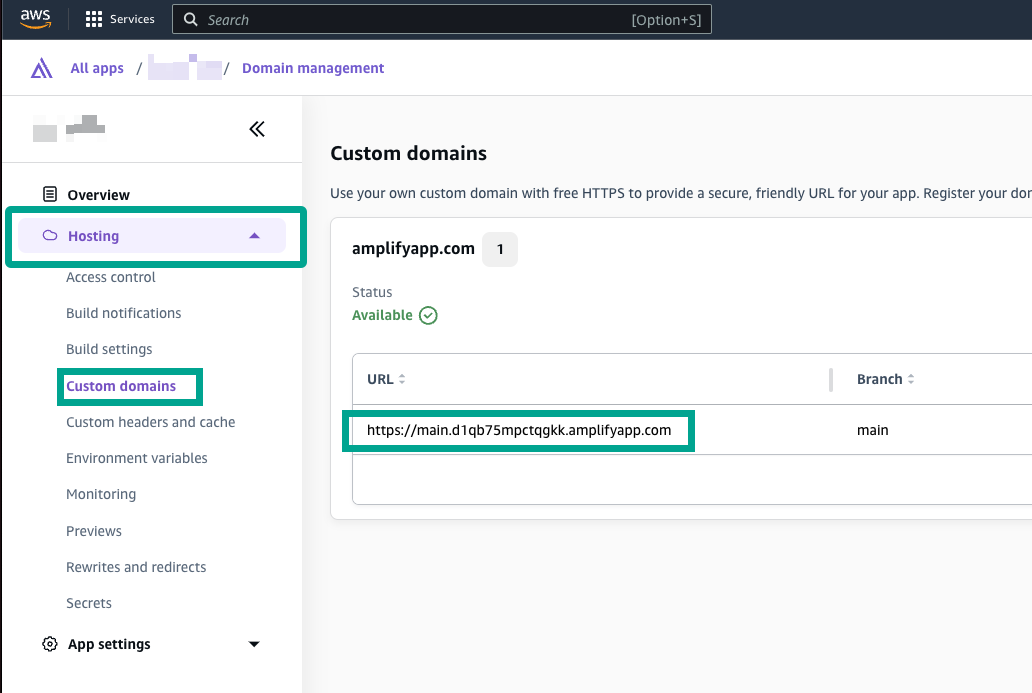
Now go to Hosting => Environment variables. We need to configure two environment variables for NextAuth.js:
- Create environment variable
NEXTAUTH_URLand paste in the value we copied earlier from the the Custom domains screen. - Create environment variable
NEXTAUTH_SECRET. The is value is used by NextAuth.js to encrypt auth cookies. See the NextAuth.js docs for creating a strong secret. You can also set this to something like "changeme" and revisit this later on, prior to launching to production.
Redeploy
After setting the NEXTAUTH_URL and NEXTAUTH_SECRET environment variables, the app is now ready to be redeployed:
- Go to the dashboard of your app, and click on the
maindeployment. - Click the
Redploy this versionbutton.
When the app finishes deployment, your Composable UI storefront is ready to use! Go back to the dashboard of your app, and click Visit Deployed URL.
Next steps
Visit the integrations guide to setup additional features like product filtering, product promotions, content orchestration, and payments.